B2Output
Settings
Clear Runs After – You can specify after how many days to clean the old runs in the system, if you specify this field to 0, then it won't clean anything, by default it's a month (30 days)
Design Per Language – Having the report designs per language or not. Used when the design for report X printed in language A is different from when it's being printed in language B.
In this case when this option is On, when saving the design, the system will save it for the current language of the report. So for each language you can have different design (This works with the PDF\Excel Designer)
Multiple Designs – You can have multiple Customizations/Designs for each report, if you turn this switch on, you will see a list of designs in the B2Design application to select the design you want to use in the conversion.
When it is switched off, each report will have one design.
On Print free used session - Free used session on print
Convert text to UTF-8 - Convert the text coming from the ERP to UTF-8
Native Excel Asis - When running Excel with asis mode, run as native mode
CSV Separator - The separator to be used for CSV format
Allow Bidi – Some Hebrew reports need this switch on to work correctly.
Include Full Font in PDF – This will include all the used fonts inside the PDF.
Boxing Font in PDF - The font size to be used with the boxing font in PDF
Header Distance – For PDF or Word by default we specify the distance between the top of the page and the top of the logo header.
Allow Arabic – If you're using Arabic fonts with Arabic encoding, you need this switch to be On.
Fix PDF on upload - When set, fix the pdf on upload to B2Win Suite. PDFs such as background, logo, footer or signature.
PDF/A Type - Set the PDF type
Display Debug Messages – We covered the Run log in the reports chapter, you can have more debug messages to help you trace errors or in case something goes wrong (For advanced users only)
SmartEngine
Fax Prefix: Prefix to be added to every fax number being populated
Fax Suffix: Suffix to be added to every fax number being populated. Together with the Fax prefix, the e-Fax syntax is generated based
No Message With Fax: In case you do not wish to get a fax confirmation, use "Yes"
Use Two Level Business Partner – If you do not have a contacts table in your ERP, this option will try to minimize the use in the contact level
One Business Partner per Contact - This will restrict the numbers of business partners per contact to one. Meaning every contact can be linked with one business partner.
System Defaults
We have talked about how B2Win have defaults, B2Win system default is the default that is being loaded when you load a report without having user default or report defaults. You can edit the system defaults from: System –> Settings -> B2Output -> System Defaults.
Global Variables
You can add a Global Variable, which is a variable that you get from the database you defined in the External database list.
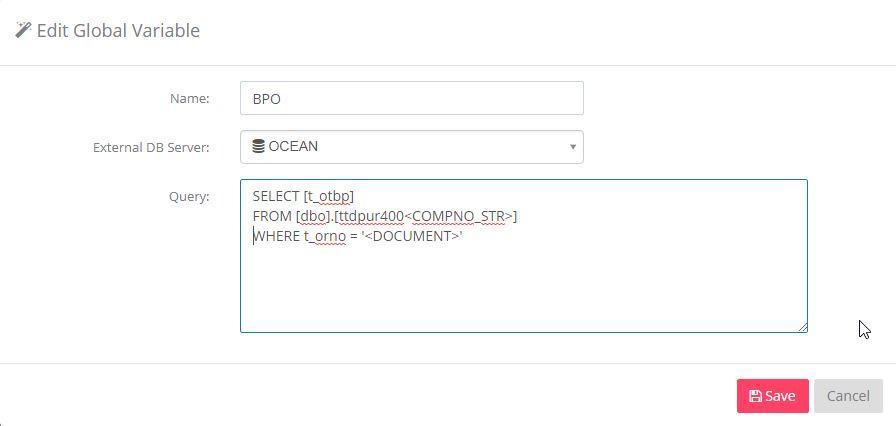
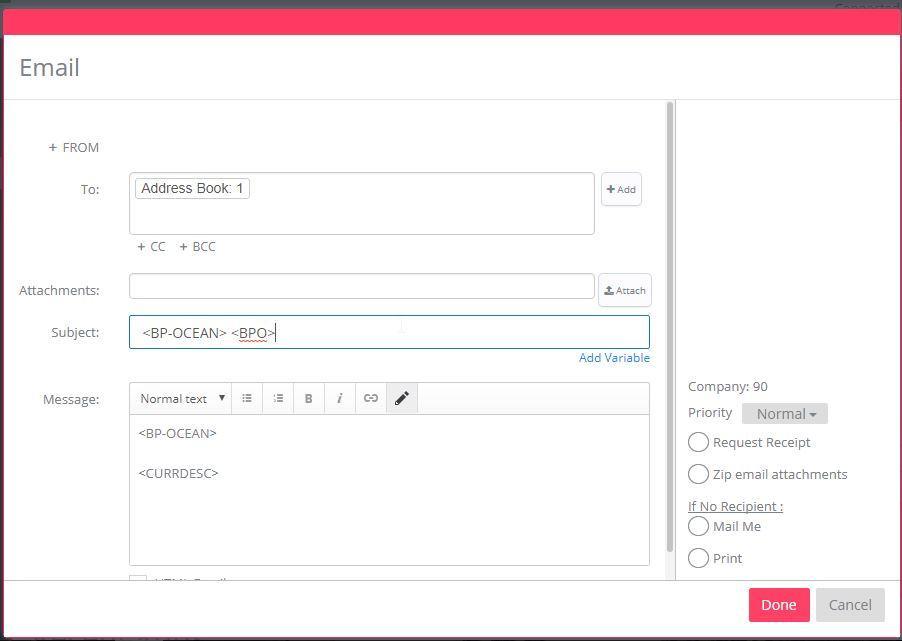
After setting the query, you can use the name you assigned as a variable in the applications.
In this example the variable is <BPO>