Infor DataFabric Trigger
The Infor DataFabric Trigger monitors an Infor DataFabric object for changes and starts a new workflow iteration each time a change is detected. Use this trigger when you need to react to real-time create, update, or delete events on an Infor business object.
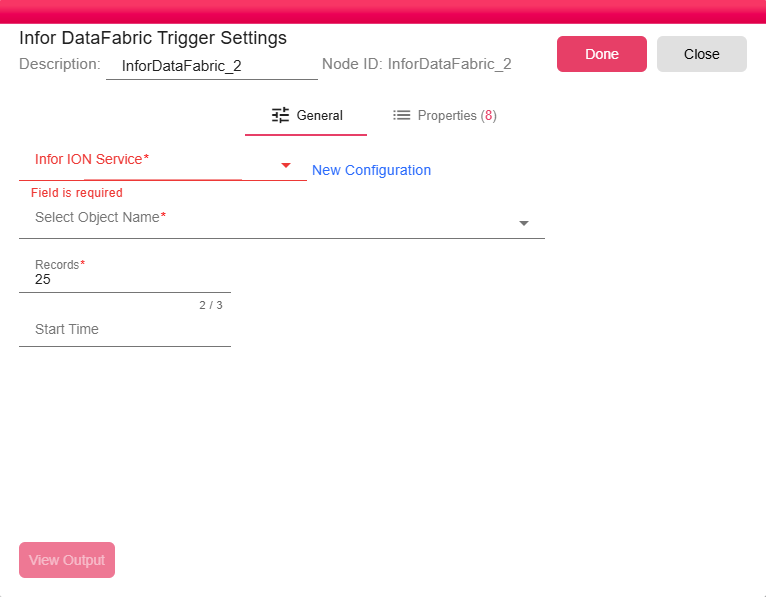
General
- Infor ION Service: Select an existing Infor ION Service configuration or click New Configuration to create one. This service provides the authenticated connection to Infor OS. The service must have the Infor-DataFabric scope enabled.
- Select Object Name: Select the Infor DataFabric object to monitor (for example,
CustomerParty,SalesOrder). The dropdown is populated from the connected Infor environment. - Records: The maximum number of change records to retrieve per trigger activation. Defaults to 25. Increase this value if you expect high-volume change events and want to process more records in a single batch.
- Start Time: An optional date and time from which the trigger should start reading changes. If left empty, the trigger begins listening from the moment the workflow is deployed. Use this field to replay historical changes from a specific point in time.
Properties
The Properties tab lists runtime properties that the trigger populates from each incoming DataFabric change event. These properties are available to all downstream nodes in the workflow.